

Make bookings to apply for a learner's license, driving license, and/or professional driving permit without visiting traffic departments, which only guarantees assistance after standing in long queues.
Steps:
Step-1 : Go to the link https://online.natis.gov.za/
Step-2 : Scroll down and Click on the link “Book now for Driving Licence Card Renewal”
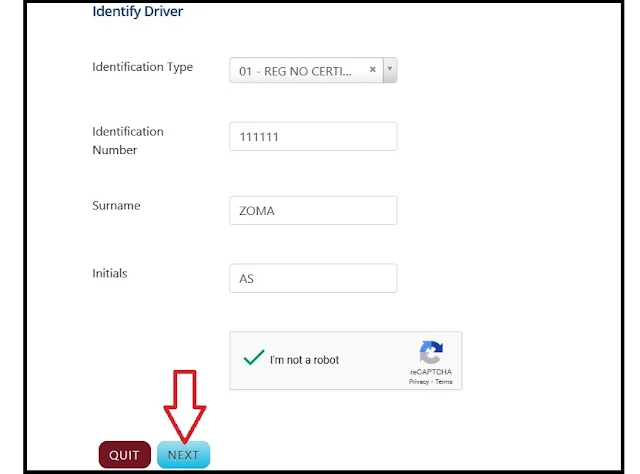
Step-3 : Select Identification Type
Step-4 : Enter the Identification Number, Surname, and Initials, and
Step-5 : Submit the “Next” button.
To ensure fair access and opportunity, open slots will be available from 08h00 in the morning until 20h00 in the evening. DLTCs have been instructed to adhere to the ‘days’ they indicate that slots will be opened, and the system will ensure that these slots are released in batches and at random times.
Please note that fees are not displayed on this site as the different sites have fees applicable to their province. Please contact the DLTC to enquire about fees.
Keywords :
Entities online, nations online learners booking
How To Book Online?
Step-by-Step Guide to NaTIS Driving Licence Card Renewal Booking
Visit the NaTIS Website:
- Go to the official NaTIS website: NaTIS Online Booking System.
Login or Register:
- If you already have an account, log in using your credentials.
- If you don't have an account, you'll need to register. Click on the "Register" button and follow the prompts to create an account.
Select Booking Type:
- Once logged in, select the type of booking you need. In this case, choose "Driving Licence Card Renewal."
Choose Your Province and License Testing Centre:
- Select your province from the drop-down menu.
- Choose the License Testing Centre (LTC) where you want to renew your driving license card.
Select a Date and Time:
- The system will show available dates and times for the selected LTC. Choose a convenient slot for your appointment.
Complete the Application Form:
- Fill out the required information, such as your personal details, driving license number, and contact information.
Confirm Booking:
- Review all the details you’ve entered to ensure they are correct.
- Confirm your booking. You will receive a booking confirmation with the details of your appointment.
Print the Confirmation:
Print the confirmation slip and bring it with you to the License Testing Centre on the day of your appointment.
- What to Bring to Your Appointment
- Booking Confirmation Slip: Printed from the NaTIS website.
- Current Driving Licence Card: Your existing driving license card.
- Identification Document (ID): Your ID book or smart card ID.
- Proof of Address: Recent utility bill or bank statement.
- Application Fee: The renewal fee, which can be paid at the center. Check the current fee on the NaTIS website or with your local LTC.
- Eye Test Certificate: Bring the certificate if you have done an eye test at an optometrist. Otherwise, you will have to undergo an eye test at the center.
Additional Tips
- Arrive Early: Arrive at the LTC a little earlier than your scheduled appointment time.
- Follow COVID-19 Protocols: Wear a mask and follow any other COVID-19 safety protocols in place.
- Check Expiry Date: Ensure you renew your license card before it expires to avoid any penalties or fines.
By following these steps, you can efficiently book and renew your driving license card through the NaTIS system.
Just follow the simple steps mentioned below for Online Booking.
Steps:
Step-1 : Go to the link https://online.natis.gov.za/
Step-2 : Scroll down and Click on the link “Book now for Driving Licence Card Renewal”
Step-3 : Select Identification Type
Step-4 : Enter the Identification Number, Surname, and Initials, and
Step-5 : Submit the “Next” button.
Note:
Slots opened to be made available over 12 hours. Please note that the management of slots opened by DLTC is now system-driven.To ensure fair access and opportunity, open slots will be available from 08h00 in the morning until 20h00 in the evening. DLTCs have been instructed to adhere to the ‘days’ they indicate that slots will be opened, and the system will ensure that these slots are released in batches and at random times.
Important Notice:
- Gauteng Province wants to ensure that all DLTCs are COVID-19 compliant to ensure the safety of applicants. The site inspection of DLTCs is almost done. Kindly note the following before visiting your preferred DLTC.
- All applicants who paid for a Learner’s Licence test, which would have taken place during the lockdown period, can apply in person at the DLTC, where the application was made to reschedule the Learner’s test.
- All applicants who paid for a Driving Licence test, which would have taken place during the lockdown period, can apply in person at the DLTC, where the application was made to reschedule the test.
Pre-Booking FAQs
1. Where can I book?
Using the web application, you can book at any registered DTLC site in Gauteng.2. How many times can I make a pre-booking?
You can only make a pre-booking once for the same license test. You cannot make the same test application at different testing stations.3. How do I pay for the pre-booking?
You must pay for your booking at the testing station where the pre-booking was made. Online payment will be offered soon.4. What about the eye test?
You can have the eye test at the DLTC on the day of the payment or go to a recognized eye specialist, who will issue an acceptable certificate at the testing station.5. How long do I have to pay?
The payment must be made within 3 days of making the pre-booking. This prevents the slot from being forfeited and allocated to another applicant. It is only a reservation of your booking until it is paid within the prescribed period to confirm the booking.Please note that fees are not displayed on this site as the different sites have fees applicable to their province. Please contact the DLTC to enquire about fees.
Contact
The website provides a telephone number and an email address for reporting difficulties or problems. For any issues or inquiries, please email our call center at onlinesupport@rtmc.co.za or call us at 0861 400 800 to assist.Keywords :
Entities online, nations online learners booking


